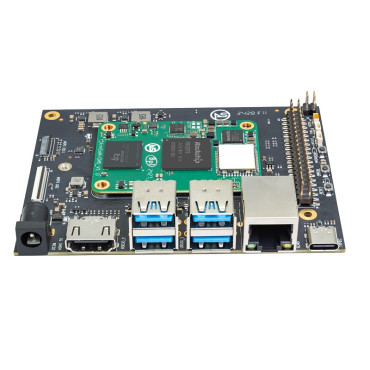


Banana Pi BPI-CM5 Pro 4GB Ram 32GB eMMC Compute Module With Rockchip RK3576
$85.55
- Brand: Banana PI
- Product Code: bpi-cm5-pro-4gb
- Availability: In Stock
- Ex Tax: $85.55
-
- 2 or more $83.62
- 4 or more $81.83
System Image
Android14
Make your device more personal, protected, and accessible with the newest OS upgrade. Improved photo quality, new themes, and AI-generated wallpapers. Privacy updates for your health, safety, and data. And expanded accessibility features.
Debian Linux
debian12 for BPI-CM5 Pro: Debian 12 brings thousands of new and updated software packages, and supports multiple desktop environments, and processor architectures including 32-bit and 64-bit PC, ARM, MIPS, and PowerPC. However, one of the biggest changes is the upgrade of the Linux kernel from version 5.10 to 6.1 LTS.
Baidu cloud: https://pan.baidu.com/s/1zPSZQ9DuJGA5vLX2WG_mOw?pwd=8888 (pincode: 8888)
Google Drive: https://drive.google.com/drive/folders/1hZvr5egTRzWP6sx3IeqD243wXv5gGkW8?usp=sharing
Armbian
Armbian is a computing build framework that allows users to create ready-to-use images with working kernels in various user space configurations for various single-board computers. It provides various pre-built images for some supported boards. These are usually Debian or Ubuntu-flavored.
Ubuntu-Rockchip
This project aims to provide a default Ubuntu experience for Rockchip RK3588 devices. Get started today with an Ubuntu Server or Desktop image for a familiar environment.
Supply Declaration
BPI-CM5 Pro will remain in production until at least August 2034.
Notes
| ELECTROSTATIC PROTECTION 1. Before handling the device, please ensure you wear an anti-static wrist strap or take electrostatic discharge measures to prevent damage to the development board. 2. Assembly should be performed in an electrostatic-safe environment, avoiding operations in dry and low-humidity conditions. 3. When not in use, store the device in an anti-static bag and keep it in a suitably temperature-controlled, low-humidity environment to prevent static electricity buildup. 4 . When handling the device, avoid friction or collisions to prevent the generation of static electricity that could cause damage. 5. When holding the device, try to avoid direct contact with the chips on the mainboard to prevent static damage. 6. Do not plug or unplug wires or other devices while the device is operating to avoid damage from electrical surges. 7. When connecting or disconnecting the GPIO/MIPI expansion interfaces, make sure to turn off the power and disconnect the power cable to prevent damage from electrical current. |
| HEAT MANAGEMENT Without effective cooling measures, the surface temperature of the main chip may exceed 60 degrees. When handling the device, please avoid direct contact with the SoC and surrounding power inductors to prevent burns. Ensure that the environment is well-ventilated during operation to prevent localized heat buildup, which could lead to overheating. Additionally, do not place the device in direct sunlight. It is recommended to choose between the official cooling fan, heat sink, or third-party cooling kits based on specific usage conditions to ensure optimal cooling performance. |