

Banana Pi BPI W2 Smart NAS Router, RTD1296 Chip Design
$74.41
- Brand: Banana PI
- Product Code: bpi-w2
- Availability: In Stock
- Ex Tax: $74.41
-
- 2 or more $72.32
- 4 or more $70.69
About this item
Soc: Realtek RTD1296 quad-core ARM A53
GPU: Mali T820 MP3 GPU
SDRAM: 2GB DDR4 (shared with GPU)
Power: 12V @ 2A via DC power 5.0mmx2.0mm jack
Low-level peripherals: 40 40-pin header, 28×GPIO, some of which can be used for specific functions, including UART, I2C, SPI, PWM, and I2S.
Onboard Network: 2x 10/100/1000Mbps Ethernet
Product Description
Introduction
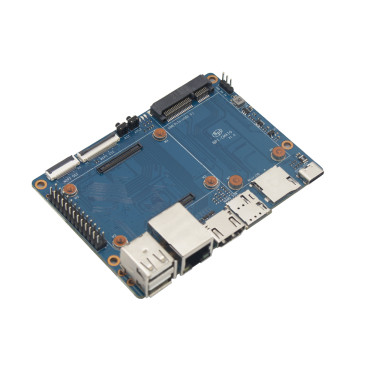
Banana PIBPI-W2 is a highly integrated multimedia network router with Realtek RTD1296 chip design; it can be used for high wireless performance, home entertainment, home automation, and so on...
BPI-W2 integrate a Quad-core ARM Cortex-A53 MPcore operating up to1.5GHz, The Router also includes a variety of peripherals, including HDMI RX/TX, Mini DP, PCIe2.0, PCIe1.1&SDIO, M.2 interface, USB 2.0, USB3.0 Port, TYPE C, SATA port,2 Gbps Port Gigabit Ethernet port, also support 802.11ac/n WLAN connection thru PCI-e port.
BPI-W2 can run with Android 6.0 smoothly, it can also run OpenWRT, Debian, Linux, Ubuntu Linux, Raspbian, and other OS. The size of Banana Pi BPI-W2 same as BPI-R2, it can easily run the games. It supports 1080P high definition video output, the GPIO is compatible with Raspberry Pi 3. More specs follow below:
Realtek RTD1296, Quad-core ARM Cortex-A5
Mali T820 MP3 GPU
2G DDR4 SDRAM
PCIE 2.0 interface.PCEe 1.1&SDIO
Support 2 SATA interface
MicroSD slot supports up to 256GB expansion
8G eMMC flash (option 16/32/64G)
Mini DP
2-port 10/100/1000 Mb Ethernet port
USB 3.0 and (2) USB 2.0, OTG port
1080P high-definition video playback
HDMI In/Out
TYPE C interface
Documents
Because of the Google security update, some of the old links will not work if the images you want to use cannot be downloaded from the new link bpi-image Files
All banana pi documents (SCH file, DXF file, and doc)
BPI-W2 hardware schematic diagram :
Google Drive: https://drive.google.com/file/d/1Xn7-nlY0kVJacnRh_EpuS5Fw92_b6qqu/view?usp=sharing
baidu cloud: https://pan.baidu.com/s/1z2FgGpWY4nPGvocx8ymmew pinecode: r5tv
BPI-W2 DXF file download: https://drive.google.com/file/d/1JDVRxcXdSi8cnX32plBmyrTiKiWDK_ev/view?usp=sharing
BPI-W2 Realtek 1296 documents download link
Google Drive: https://drive.google.com/file/d/1PLlU5d0INA2U6Er5unEC7-FpnAmkSh7x/view?usp=sharing
Baidu Cloud: https://pan.baidu.com/s/1geV5JNl
SATA-RSM-C052-X22XX spec
download link: https://drive.google.com/file/d/0B4PAo2nW2KfncWNYV1l5MkpiQTQ/view?usp=sharing
Banana Pi BPI-W2 CE FCC RoHS Certification
Banana Pi BPI-W2 play video with openwrt (kernel 4.9.119):https://www.youtube.com/watch?v=ZQxxMRzK84Q&feature=youtu.be
Amazon AWS Greengrass
Banana Pi BPI-W2 passed Amazon AWS Greengrass:https://devices.amazonaws.com/detail/a3G0h000000OvNJEA0/Banana-Pi-BPI-W2.
Image Release
All image link: https://drive.google.com/drive/folders/1xBxYgKM40GrBa-qfgPDD-cRrUhWBo34u
Android
2020-07-23 update
Android 7.1, kernel 4.1
Android Normal Version: Normal Android image without hwnat and openwrt enabled
Android Router Version: Router mode android image with hwnat and openwrt enabled, ethernet and wifi network must be configured in Openwrt system(Settings->More->Openwrt Settings). The port with a bar code label is a WAN port, and the br-lan IP is 172.16.1.1.
Android ATV version: ATV version android image without hwnat and openwrt enabled. Click the right button to show the navigation bar. If you use a mouse for testing.
Android 6.0, kernel 4.1
Android 6.0 image only supports a normal Android build without the second Ethernet port enabled. Android 6.0 is no longer maintained, and this is the final release.
How to install Android Image
2019-8-16 update This release is for banana pi W2 board, and it is based on Android6.0 & 7.1 Operation system with kernel 4.1
Android 6.0
Features Map: http://wiki.banana-pi.org/W2_Image_Map#Android_6.0_HDMI
Google Drive: https://drive.google.com/open?id=1cblHB2rKnDOZmhxbHL79k3QlYfAHOdBe
Baidu Drive : https://pan.baidu.com/s/1ZdI4Y7B-u7kp8XguGXFkuQ (PinCode:8noz)
MD5 : 1a90335d798863e31f99c1fae615c43c
Android 7.1
Features Map: http://wiki.banana-pi.org/W2_Image_Map#Android_7.1_HDMI
Google Drive: https://drive.google.com/open?id=1j1n10Wh9jE7TCDMutwLifPavt_PJ-5x3
Baidu Drive : https://pan.baidu.com/s/12MkYp0oQ9cUN2N8J3WrHrg (PinCode:2cyy)
MD5 : 713ddd26e6f2c085c464442e058cf390
Forum pthread:http://forum.banana-pi.org/t/bpi-w2-new-image-android-6-0-7-1-for-emmc-20190816/9728
2019-01-14 update: BPI-W2 Android 7 new image support Google GMS
Baidu Drive: https://pan.baidu.com/s/1_aT1jJHrOJdeEeGa6J1EYA
Google Drive: https://drive.google.com/open?id=1KhvanoNNZYI16vYatYCqWsnKS2Wyl37L
forum pthread: http://forum.banana-pi.org/t/bpi-w2-android7-new-image-support-gms-20190114/7688
2019-05-09 update, This release is for banana pi W2 board which is based on RTD1296, Android 6.0 Operation system with kernel 4.1.17.
BPI-W2 Android 6.0 Features Map:http://wiki.banana-pi.org/W2_Image_Map#Android_6.0_HDMI
Google Drive: https://drive.google.com/open?id=1h3XhhmY1SQpzDOKCY3hqPoHJlJdkqhuY
Baidu Drive : https://pan.baidu.com/s/13CNmfW5ZlSmzgrDLp6mptg (PinCode:m8qt)
MD5 : 30226f82f85b88b7c345affa202268eb
Forum pthread:http://forum.banana-pi.org/t/bpi-w2-new-image-release-android-6-0-2019-05-09/9207
OpenWRT
2019-10-04 update Banana Pi BPI-W2 (RTD1296) new image: OpenWrt Lede with Kernel 4.9
download link: https://drive.google.com/drive/folders/1p5tk6-8E498llDBYnabZHJtsEosUufnr
forum pthread: http://forum.banana-pi.org/t/banana-pi-bpi-w2-rtd1296-new-image-openwrt-lede-with-kernel-4-9/10013
Image Link: Linux kernel 4.4
Baidu Drive: https://pan.baidu.com/s/1Rs9F46wNJibORaeCfVh4wg PinCode: 1w4w
Google Drive:https://drive.google.com/file/d/10kfP142Jw0sA92uwaIYZt7CeXcDKelO1/view?usp=sharing
Forum thread:
http://forum.banana-pi.org/t/bpi-w2-new-image-burn-openwrt-with-linux-kernel-4-4-2018-4-25/5510
Ubuntu
2019-6-18 update,This release is for banana pi M4 & W2 board, and it is based on Ubuntu Mate 18.04 & Ubuntu Server 16.04 Operation system with kernel 4.9.119.
BPI-M4/BPI-W2 Ubuntu Mate 18.04
Features Map: http://wiki.banana-pi.org/M4_Image_Map#Ubuntu_18.04_Mate
Google Drive: https://drive.google.com/open?id=1nPI2dy_KCW4h5korQdvj0iymHIDyxIPq
Baidu Drive: https://pan.baidu.com/s/1tB_QZ6zgmKiYstcZwn51gg (PinCode:edrc)
MD5 : 7409b48a46e0bbc2d0ae2e70a49bfb36
BPI-M4/BPI-W2 Ubuntu Server 16.04
Features Map: http://wiki.banana-pi.org/M4_Image_Map#Ubuntu_18.04_Mate
Google Drive: https://drive.google.com/open?id=1G4915FPOU4pDzbI0TCFH8wWXUGmNdlkF
Baidu Drive : https://pan.baidu.com/s/1lkG6gyzn-KPbvrEhf6Q85w (PinCode:5jbo)
MD5 : 328706256bec238df50f9bd6ab8dfd1b
Issue: if HDMI doesn't display, please try "ctrl + alt + F1" to change terminal, then "ctrl + alt + F7" to change to desktop display.
Forum thread: http://forum.banana-pi.org/t/bpi-m4-demo-image-release-ubuntu-mate-18-04-ubuntu-server-16-04-2019-06-18/9362
2018-09-17 update. This release is for the Banana Pi W2 board, which is based on Realtek RTD1296, and it is based on the Ubuntu 18.04 operating system with kernel 4.9.119.
Image Link:
W2 Features Map: http://wiki.banana-pi.org/W2_Image_Map
Baidu Drive: https://pan.baidu.com/s/1iLOa1MOgtSqY6dVsQ_SyQg
Google Drive:https://drive.google.com/open?id=1PQO9tA4w_wJvDIz64xJrXzSNS1g4GSlB
Forum thread: http://forum.banana-pi.org/t/bananapi-w2-ubuntu-18-04-new-image-release-2018-09-17/6790
http://forum.banana-pi.org/t/bpi-w2-new-image-how-to-make-and-run-the-64-bit-ubuntu-16-04-on-sd-card-2018-4-28/5546
Debian
2019-08-13 update BPI-M4/BPI-W2 Debian 10 Buster Desktop New Demo Image. This release is for the Banana Pi M4 and W2 boards, and it is based on the Debian 10 operating system with kernel 4.9.Debian 10 buster desktop(32bit)
Features Map: http://wiki.banana-pi.org/M4_Image_Map#Debian_10_buster
Google Drive: https://drive.google.com/open?id=1rVrZStsw2PINBhIxCzOLOtYLbtoECmEk
Baidu Drive : https://pan.baidu.com/s/1WcrBkxm5OyBLedCBwaUz6Q (PinCode:e6m3)
MD5 : 300b37cdfa092d72dceddd4f33825b40
Forum Pthread:http://forum.banana-pi.org/t/bpi-m4-bpi-w2-debian10-buster-desktop-new-demo-image-20190813/9712
FAQ
Issue: if HDMI doesn’t display, please try “ctrl + alt + F1” to change terminal, then “ctrl + alt + F7” to change to desktop display.
SW2: switch to 0, if insert SD, SD start; if it doesn’t insert SD, EMMC start.
2019-08-06 update, BPI-M4/BPI-W2 Debian 10 Buster Lite Demo Image. This release is for the Banana Pi M4 and W2 boards, and it is based on the Debian 10 operating system with kernel 4.9.
Debian 10 buster AArch64 (64bit)
Features Map: http://wiki.banana-pi.org/M4_Image_Map#Debian_10_buster
Google Drive: https://drive.google.com/open?id=1QyZX5AGUpEV2OZMXz3qkB8riXROXHdx3
Baidu Drive : https://pan.baidu.com/s/1CGxGUi8rt06tHwfk134Seg (Pincode:7rcz)
MD5 : 5a8b1eb36b782fdd742ba746c645593d
Debian 10 buster (32-bit)
Features Map: http://wiki.banana-pi.org/M4_Image_Map#Debian_10_buster
Google Drive: https://drive.google.com/open?id=1WJlKTMPAipYnDFqIPl_dmR76oobuO5Wd
Baidu Drive : https://pan.baidu.com/s/1lTtcMTWqE0jG_1PWGtWSqw (Pincode:gny6)
MD5 : a59f2e6a298237a08bb523b53372d937
FAQ
For more info, please see here:
BPI-M4: http://wiki.banana-pi.org/Getting_Started_with_M4
BPI-W2: http://wiki.banana-pi.org/Getting_Started_with_W2
2018-09-18 update. This release is for the Banana Pi W2 board, which is based on Realtek RTD1296, and it is based on the Debian 9 operating system with kernel 4.9.119.
Image Link:
W2 Features Map: http://wiki.banana-pi.org/W2_Image_Map#Debian_9
Baidu Drive:https://pan.baidu.com/s/1bmTektF0ufRL9_FOpdoO2w
Google Drive:https://drive.google.com/open?id=1z1l56qX7BhsD44ha4IGDBhi-_ZqwCjoC
Forum pthread: http://forum.banana-pi.org/t/banana-pi-bpi-w2-new-image-debian-9-linux-image-release-2018-09-18/6797
Rasbian
2019-6-19 update,This release is for banana pi M4 & W2 board, and it is based on Raspbian 9.8 stretch & AArch64 Linux Mate & AArch Linux Lite Operation system with kernel 4.9.119.
Features Map: http://wiki.banana-pi.org/M4_Image_Map#Raspbian_9.8_stretch
Google Drive: https://drive.google.com/open?id=15cypBk4NKL0X8uD3Mffc__Sx05j39xCW
Baidu Drive: https://pan.baidu.com/s/1gwD5ok9XLLQa0InU_-b7EA (PinCode:uuqn)
MD5 : a397a9c4d078c2841f0c243c573dc9a8
FAQ
Issue: if HDMI doesn't display, please try "ctrl + alt + F1" to change terminal, then "ctrl + alt + F7" to change to desktop display.
SW2: switch to 0, if insert SD, SD start; if it doesn't insert SD, EMMC start.
Forum pthread:http://forum.banana-pi.org/t/bpi-m4-bpi-w2-demo-image-release-raspbian-9-8-stretch-aarch64-linux-mate-aarch64-linux-lite-2019-06-19/9370
2018-09-17 update, This release is for the banana pi W2 board, which is based on Realtek RTD1296, and it is based on Raspbian 9.4 operating system with kernel 4.9.119.
BPI-W2 Features Map: http://wiki.banana-pi.org/W2_Image_Map#Raspbian_9.4
Baidu Drive:https://pan.baidu.com/s/1aL5ZsHIRwM-1rvnZDiR3EA
Google Drive:https://drive.google.com/open?id=11-WbfJK0jNVgutg9UVKfiIIJtfHXi-9j
Forum pthread: http://forum.banana-pi.org/t/banana-pi-bpi-w2-new-image-raspbian-9-4-new-image-release-2018-09-17/6824
Arch Linux
2019-6-19 update,This release is for banana pi M4 & W2 board, and it is based on AArch64 Linux Mate & AArch linux liteOperation system with kernel 4.9.119.
Features Map:
Google Drive: https://drive.google.com/open?id=1fsk5S4zQfo3tl97Nty_QA1uAEqgB63YK
Baidu Drive : https://pan.baidu.com/s/1GvGsfs7t018EoRIv-au1GA (PinCode:o496)
MD5 : d284b2326a36d2d9039fb8d7e20e2600
AArch64 Linux Lite
Features Map:
Google Drive: https://drive.google.com/open?id=17V49oBoJZ18MKjSHD_LKjf1Z7qEokYn7
Baidu Drive: https://pan.baidu.com/s/1WivDWZHu_GnWOxhVOjoqIQ (PinCode:uhcg)
MD5 : 53bb6f8d00f8708dab96bc865eaddc5e
FAQ
Issue: if HDMI doesn't display, please try "ctrl + alt + F1" to change terminal, then "ctrl + alt + F7" to change to desktop display.
SW2: switch to 0, if insert SD, SD start; if it doesn't insert SD, EMMC start.
Forum pthread:http://forum.banana-pi.org/t/bpi-m4-bpi-w2-demo-image-release-raspbian-9-8-stretch-aarch64-linux-mate-aarch64-linux-lite-2019-06-19/9370
OpenSUSE
2018-09-25 update, This release is for the banana pi W2 board, which is based on realtek RTD1296, and it is based on the OpenSUSE operating system with kernel 4.9.119.
BPI-W2 Features Map: http://wiki.banana-pi.org/W2_Image_Map
Baidu Drive:https://pan.baidu.com/s/1UZl-UFUugPhCPaFHBB9_GA
Google Drive: https://drive.google.com/open?id=1j_486I9v2VuPXslWyk9OlmOIPMxcxZGs
Forum path: http://forum.banana-pi.org/t/bananapi-bpi-w2-new-image-opensuse-release-2018-09-25/6851
Kali Linux
2018-09-25 update: This release is for the Banana Pi W2 board, which is based on Realtek RTD1296, and it is based on the Kali operating system with kernel 4.9.119.
BPI-W2 Features Map: http://wiki.banana-pi.org/W2_Image_Map
Baidu Drive:https://pan.baidu.com/s/1eslUG_xlHHsGwHk_Lq_bVw
Google Drive:https://drive.google.com/open?id=1QQXs-YjZtwOfEEc73wfNtLy67ZZwVai7
Forum pthread: http://forum.banana-pi.org/t/bananapi-bpi-w2-new-image-kali-rolling-release-2018-09-25/6855
RPiTC
2018-09-03 update :RPiTCv3_1.12-demo-bpi-w2-beta with Linux kernel 4.9.119
image download:
google drive: https://drive.google.com/open?id=1sWjMuKncqDDsb3cGmg22oJs-U2fZjOv0
Baidu Cloud: https://pan.baidu.com/s/1sd9hoOwyfAxWlGroDMOj4A
More about RPiTC: http://rpitc.blogspot.com/
Forum pthread: http://forum.banana-pi.org/t/bpi-w2-new-iamge-rpitcv3-1-12-demo-bpi-w2-beta-2018-09-03/6686